ANCI vs Microsoft Copilot
Microsoft Copilot enhances productivity across Office 365. ANCI's Zara schedules meetings end-to-end — autonomously. Copilot guides you through clicking buttons. Zara takes ownership of the outcome. Here's the complete 2026 comparison for mid-size companies.
The Story: When "AI-Assisted" Isn't the Same as "AI-Executed"
A 250-person professional services firm rolled out Microsoft Copilot in Q4 2025. Their COO was excited — AI would finally fix their scheduling mess. They were spending 35+ hours per week across the exec team just coordinating client meetings across three continents.
Three months in, the reality was different. Copilot was excellent at summarizing meeting notes, drafting follow-up emails, and suggesting agenda items. But when the COO said "schedule a meeting with the Tokyo and London teams next week," Copilot showed her available slots and highlighted buttons to click. She still had to do the coordination herself.
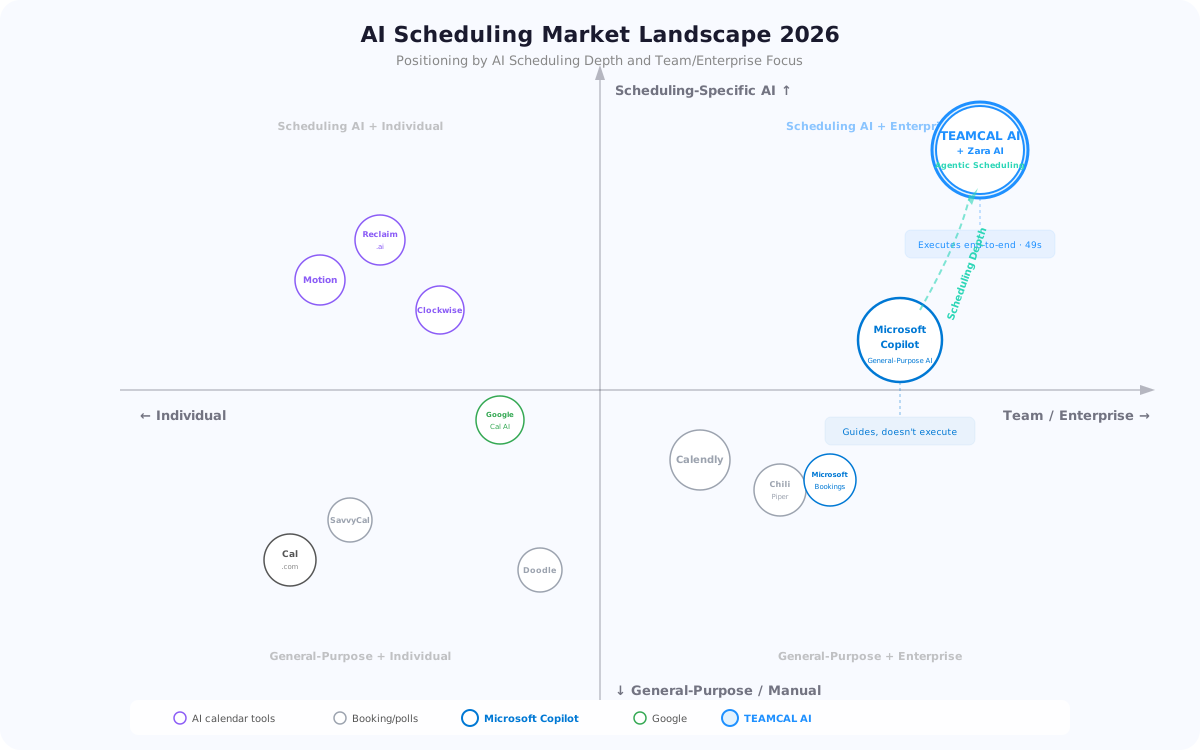
The problem: Copilot is a general-purpose productivity AI that lives inside Microsoft 365. It makes you faster at tasks you're already doing. But it doesn't do the scheduling — it helps you do it.
In February 2026, they added ANCI with Zara AI. The difference was immediate:
- "Schedule a leadership sync with Tokyo and London" → Zara checked all calendars, emailed external stakeholders, resolved conflicts, and booked the meeting. 49 seconds. No clicks.
- Copilot continued handling what it does best: meeting summaries, document drafting, task automation
- Scheduling time dropped from 35 hours/week to under 4 hours/week
They didn't replace Copilot. They complemented it with the scheduling-specific AI it was missing.
General-Purpose AI vs Scheduling-Specific AI
This comparison is not about which AI is "better." It's about understanding what each is built for:
- Microsoft Copilot is a general-purpose productivity AI embedded in Office 365. It drafts documents, summarizes emails, creates presentations, and assists with tasks across Word, Excel, Teams, and Outlook. For scheduling, it suggests times and highlights buttons — but you execute.
- ANCI (Zara) is a scheduling-specific agentic AI. It doesn't draft documents or create spreadsheets. It schedules meetings — end-to-end, autonomously, across companies and time zones. You tell Zara what you need; she delivers a confirmed meeting.
The most effective mid-size companies use both: Copilot for productivity, ANCI for scheduling. They're complementary, not competitive.
Head-to-Head: Scheduling Capabilities
Scheduling time saved with Zara AI
Avg meeting coordination time with Zara
Zara end-to-end scheduling vs 2★ Copilot
/user/mo ANCI vs $30/user/mo Copilot
“Zara schedules for you. She doesn't suggest steps, draft instructions, or guide clicks — she takes ownership of the outcome. No back-and-forth. No stalled threads. No execution gaps.”
Where Each AI Excels
Zara: Executes Scheduling
Finds optimal times, reaches out to participants, captures responses, confirms, books, reschedules, and notifies — all autonomously.
Copilot: Enhances Productivity
Drafts emails, summarizes meetings, creates presentations, automates internal workflows across Microsoft 365.
Zara: Cross-Platform
Works across Google, Outlook, Slack, Teams, Zoom, Webex. Zara doesn't live inside one app — she connects the entire ecosystem.
Together: Full Coverage
Copilot handles internal productivity. Zara handles scheduling. No overlap. Maximum efficiency. Both running simultaneously.
See Zara Schedule a Meeting in 49 Seconds
Watch what Copilot can't do — Zara coordinates across companies, time zones, and platforms. Autonomously.
Request a DemoWhy Mid-Size Companies Need Both (Not Either/Or)
The most common mistake mid-size companies make is assuming Microsoft Copilot will solve their scheduling problems because it's "AI." Copilot is extraordinary at what it does — but scheduling execution is not what it does.
What Copilot handles brilliantly:
- Drafting and editing documents in Word
- Summarizing email threads and Teams conversations
- Creating presentations from data
- Automating repetitive tasks inside Microsoft 365
- Meeting recaps, action items, and follow-up drafts
What Copilot does NOT do:
- Schedule meetings end-to-end without user intervention
- Coordinate with external participants outside your Microsoft org
- Work across Google Calendar, Slack, Zoom, or Webex
- Autonomously resolve scheduling conflicts across time zones
- Handle the back-and-forth email coordination with clients and vendors
That's exactly where Zara AI fills the gap. The PDF comparison from ANCI's own analysis puts it directly: "Copilot guides you through doing it yourself. Zara performs actions directly." For scheduling specifically, that difference is measured in hours per week.
Zara AI vs Microsoft Copilot — The Scheduling Showdown
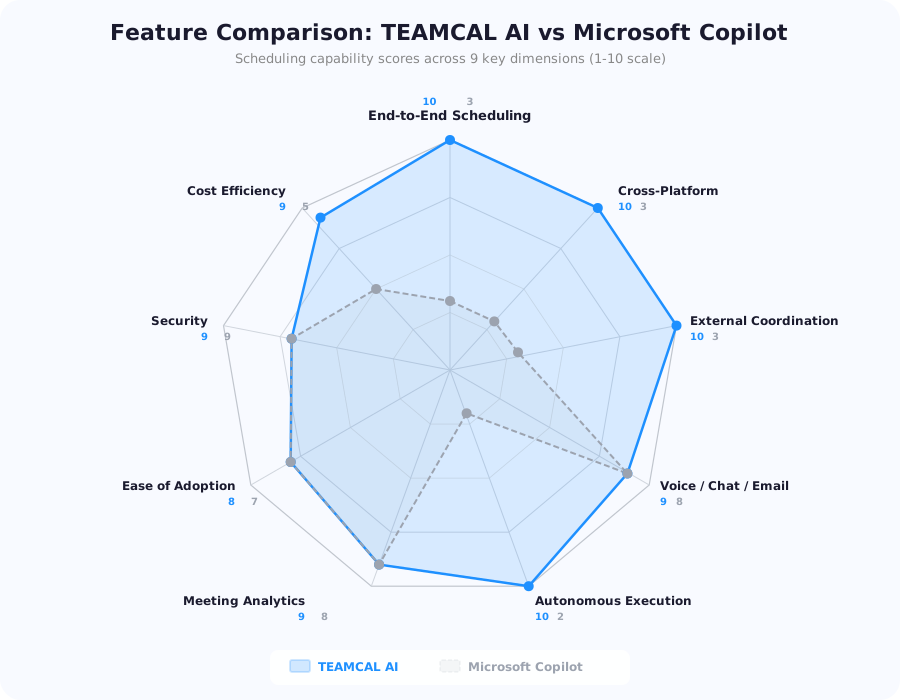
Here's the detailed feature comparison from the full 19-page competitive analysis:
Natural language understanding: Both score 5/5 — both understand commands like "schedule a meeting" or "move my 5pm."
Communication channels: Zara works across voice, chat, and her own email identity. Copilot responds via chat and voice inside Microsoft apps. Zara's email capability means she can coordinate with anyone — even people who've never heard of ANCI.
End-to-end scheduling execution: Zara 5/5, Copilot 2/5. This is the core differentiator. Zara autonomously schedules, confirms, and books. Copilot highlights buttons and suggests steps but doesn't execute.
External participant coordination: Zara 5/5, Copilot 3/5. Zara handles multi-stakeholder coordination via email and chat across companies. Copilot is strongest inside Microsoft organizations.
Cross-platform integrations: Zara 5/5, Copilot 2/5. Zara works across Google, Outlook, Slack, Zoom, Teams, Webex. Copilot is limited to Microsoft 365.
Autonomous execution without user intervention: Zara 5/5, Copilot 2/5. Zara performs actions directly. Copilot highlights buttons and suggests steps.
The pattern is clear: for anything inside Microsoft 365 (documents, emails, presentations), Copilot wins. For scheduling specifically — especially cross-company, cross-platform, cross-timezone — Zara is in a different category entirely.
How Zara AI Works: Voice, Chat, and Email
Zara AI fits the way work actually happens. Business coordination still runs on email, and Zara has her own email identity — allowing her to operate naturally inside real-world workflows.
Three ways to interact with Zara:
- Voice: "Zara, schedule a client review with the Singapore team next Tuesday afternoon"
- Chat: Message Zara in Slack or Teams with your request in plain English
- Email: Forward or CC Zara on any email thread — she picks up the scheduling context and acts
What Zara does after you tell her:
- Scans all participants' calendars (Google, Outlook, or both)
- Finds optimal times respecting timezone constraints and preferences
- Reaches out to external participants via her own email
- Captures responses and resolves conflicts
- Confirms, books, and sends calendar invites
- Handles rescheduling and follow-ups automatically
Compare this to Copilot: "Hey Copilot, schedule a meeting with Tokyo" → Copilot shows you available time slots and highlights the "Send invite" button. You still click, type, send, wait for responses, handle conflicts, and follow up manually.
The difference is delegation vs assistance. Copilot assists you in doing the work. Zara does the work.
Cross-Platform Reality: Why Microsoft-Only Doesn't Work
Mid-size companies don't live in a single ecosystem. Your team might use Outlook, but your clients use Gmail. Your internal chat is Teams, but your vendor uses Slack. Your video calls are on Zoom one day, Webex the next.
Microsoft Copilot's limitation: It only works inside Microsoft 365. If a meeting involves anyone outside your Microsoft org — a client on Google Calendar, a vendor on Slack, a partner using Zoom — Copilot can't coordinate with them.
Zara AI's cross-platform capability:
- Works with both Google Calendar and Microsoft Outlook
- Integrates with Slack, Microsoft Teams, and other collaboration tools
- Supports Zoom, Webex, and other video platforms
- Coordinates via email with anyone — no app installation required
- Manages multiple time zones and calendar preferences simultaneously
This is not a minor difference. For mid-size B2B companies that schedule regularly with external stakeholders, Copilot's Microsoft-only constraint means it can't handle the scheduling work that actually takes the most time: cross-company coordination.
Security, Compliance, and Data Privacy
Both platforms take security seriously, but their approaches differ based on their scope:
ANCI security:
- AWS hosting with HTTPS encryption
- Multi-Factor Authentication (MFA)
- SOC 2 ready with regular audits
- GDPR and CCPA compliant
- Calendar data never stored — retrieved dynamically on request
- Strict LLM privacy — scheduling data never used for AI training
- Scheduling-specific data security focus
Microsoft Copilot security:
- Microsoft 365 compliance framework
- Enterprise encryption and security controls
- SSO and admin controls
- Focus on document management and internal collaboration security
ANCI's key differentiator: zero calendar data storage. Meeting data is never persisted — it's retrieved dynamically when needed and never shared with third parties. For companies handling sensitive scheduling data (M&A meetings, board calls, client negotiations), this is a significant advantage over general-purpose AI systems that may process calendar data alongside other Office 365 content.
ROI and Cost Efficiency for Mid-Size Teams
The cost structures are fundamentally different because the products serve different purposes:
ANCI pricing:
- InterviewSync — $20/user/month: Up to 100 team members and partners + ADI Meetbot assistant
- ClientSync — $45/user/month: Up to 500 team members and partners + Zara AI + dedicated account manager
- Key advantage: Only users with heavy meeting volumes need paid seats. Rest of the company uses the free plan.
Microsoft Copilot pricing:
- $30/user/month (Microsoft 365 Copilot add-on)
- Requires existing Microsoft 365 E3/E5 license
- Covers all Office 365 productivity features, not just scheduling
The ROI math for a 15-person team:
- ANCI ClientSync: 15 × $45 = $675/month ($8,100/year)
- Time saved: ~40 hours/week × $75/hr = $156,000/year in productivity gains
- That's a 19x ROI on scheduling alone
Copilot's ROI is harder to isolate for scheduling because it bundles scheduling assistance with document drafting, email summarization, and other features. Its value is spread across all Office 365 tasks — making it complementary to, not competitive with, ANCI's scheduling-specific ROI.
Calculate your specific savings with the ANCI ROI Calculator.
The Verdict: Complementary, Not Competitive
Use Microsoft Copilot for:
- Drafting and editing documents, emails, and presentations
- Summarizing meetings, threads, and conversations
- Automating internal workflows inside Microsoft 365
- Creating reports and analyzing data in Excel
- General productivity enhancement across Office apps
Use ANCI (Zara) for:
- Scheduling meetings end-to-end — autonomously, no clicks required
- Coordinating with external stakeholders, clients, and vendors
- Managing meetings across multiple time zones
- Cross-platform scheduling (Google + Outlook + Slack + Zoom + Webex)
- Timeboxing, meeting fatigue management, and productivity rings
- Executive assistant scheduling delegation
The optimal stack for mid-size companies: Microsoft 365 + Copilot for internal productivity, ANCI + Zara for scheduling. No overlap, no redundancy — each AI handles what it was purpose-built for.
The firm in our opening story saved 31 hours per week by adding ANCI alongside Copilot. Copilot didn't fail them. It just wasn't built for the scheduling problem. Zara was.
Frequently Asked Questions
No — they're complementary. Copilot enhances productivity across Microsoft 365 (documents, emails, presentations). ANCI's Zara handles scheduling end-to-end. The best approach is using both: Copilot for internal productivity, Zara for meeting coordination.
Copilot can suggest available times and highlight buttons to click, but it doesn't execute scheduling end-to-end. You still need to send invites, handle responses, and resolve conflicts manually. Zara AI handles the entire workflow autonomously — from finding times to confirming bookings.
Yes. ANCI integrates natively with Microsoft Outlook, Microsoft Teams, Google Calendar, Slack, Zoom, and Webex. Unlike Copilot, it works across platforms — not just within Microsoft 365.
ANCI starts at $20/user/month vs Copilot at $30/user/month. Only heavy meeting users need paid ANCI seats — the rest of the company uses the free plan. Copilot requires a Microsoft 365 E3/E5 license plus the $30/user add-on.
Yes. ANCI works with Google Workspace, Microsoft 365, or both simultaneously. It's platform-agnostic. Copilot requires Microsoft 365.
Yes. ANCI uses AWS hosting, HTTPS encryption, MFA, and is SOC 2 ready. Calendar data is never stored — retrieved dynamically and never shared. See our Security page and Trust Center.
Download the Full Comparison PDF
Get the detailed analysis with feature matrices, pricing breakdown, and deployment recommendations.

ANCI vs Microsoft Copilot — Full Analysis
Download the complete 19-page competitive analysis: scheduling capabilities, security, ROI, and integration comparison.